

Contattami.biz

Android app available now

Your workspace. Always with you.

Contacts, email, appointments and your mini-site: manage your business from your phone. The Android app is available now: download it directly here. Coming soon to Google Play, with an iPhone app on the way. The web app also works on both platforms.

For business owners aged 18 or older. An active Contattami account is needed to access the workspace. Visitors opening your NFC card do not need the app.

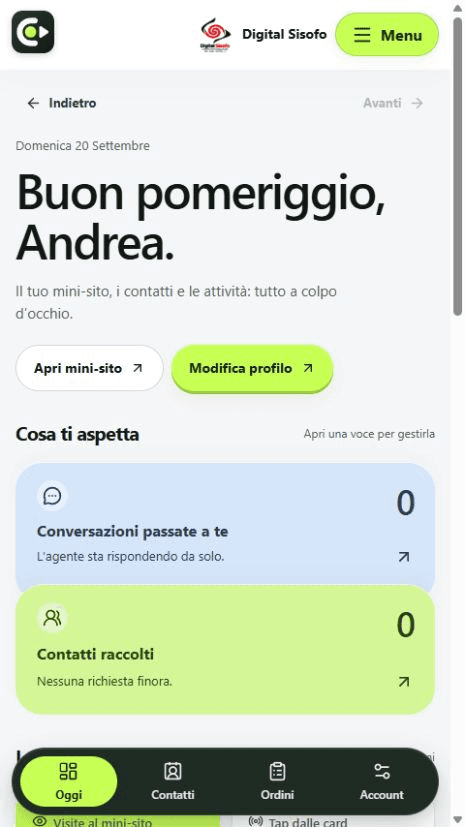
Actual Digital Sisofo workspace: profile, contacts and conversations
Actual Digital Sisofo workspace

Choose your phone.

Android

Available now · direct download

Download the signed Android app directly from Contattami: your workspace, QR reader and business notifications. No Google Play download is needed.

Download for Android

Version 0.2.6 · APK · 1.4 MB · Android 8 or later

  1. Download the file on your Android phone.
  2. Open it from Downloads. If Android asks, allow installation from the browser you used.
  3. Confirm Install, open Contattami and sign in. You can then turn off that browser’s installation permission.

Installation requires your confirmation on the phone. Keep Android security checks enabled. For updates, return to this page to download the latest version.

Coming soon to Google Play

The store release and open testing are under review. You can already download Android directly here; availability on Google Play depends on approval by Google.

iPhone

Coming to the App Store

A dedicated iPhone app is in preparation. It is not yet available on the App Store. Request a notification, or add the web app to your Home Screen today.

Notify me for iPhone

Ready today, as a web app.

Open the workspace in your browser and add it to your Home Screen. You will have an icon to open Contattami directly. An internet connection is required.

Android · Chrome

  1. Open the workspace and sign in.
  2. Open the ⋮ menu in Chrome.
  3. Choose Install app or Add to Home screen, then confirm.

iPhone · Safari

  1. Open the workspace in Safari and sign in.
  2. Tap Share, then Add to Home Screen.
  3. If shown, enable Open as Web App, then tap Add.
Open your workspace

Menu labels depend on the phone and browser version. The web app uses browser capabilities; native QR and notification features may differ.

Be ready for the launch.

Leave your email for an availability notice from the Contattami team. This interest list is separate from Google Play preregistration: on Google Play, Google sends the launch notification.

No payment, subscription or automatic account creation.

Notify me at launch

Choose your phone. We will use your email only for the availability notice you request. All fields are required.

The Contattami team handles this list. You can cancel your request by writing to [email protected].